
Creating personalized home décor has never been easier thanks to Cricut machines and SVG files. These versatile tools allow crafters of all levels to design custom items that reflect their personality and style. From wall art to custom pillows, Cricut machines open up a world of possibilities for making your home uniquely yours.
Whether you’re a beginner or an experienced crafter, understanding how to combine SVG files with your Cricut machine can take your home décor projects to the next level. In this guide, we’ll explore the tools you need, tips for using SVG designs effectively, and practical ideas for incorporating personalized elements into your living spaces.
What Are SVG Files and Why Are They Important for Cricut Projects?
SVG stands for Scalable Vector Graphics, a file format used widely in digital crafting. Unlike standard image files, SVG files are scalable without losing quality, making them perfect for cutting intricate designs on Cricut machines.
SVG files can be used for a wide variety of home décor projects, including:
- Wall decals
- Customized signs
- Decorative pillows
- Photo frames
- Table centerpieces
By using SVG files with your Cricut, you can create highly detailed, professional-looking designs that are impossible to achieve by hand. Many crafters prefer SVGs because they are easy to manipulate in Cricut Design Space, allowing adjustments to size, color, and layer arrangement.
How to Choose the Right Cricut Machine for Home Décor?
Not all Cricut machines are created equal. Depending on your home décor goals, you might consider different models:
- Cricut Joy: Compact and perfect for small projects like wall decals and labels.
- Cricut Explore Air 2: Offers more cutting options and works with a wide range of materials.
- Cricut Maker: The most versatile machine, capable of cutting fabric, wood veneer, and heavier materials for advanced décor projects.
Choosing the right machine ensures your personalized décor projects are both precise and durable. Consider the materials you want to use and the complexity of your designs before investing.
How to Prepare SVG Files for Cricut Home Décor Projects?
Before you start cutting, proper preparation of SVG files is essential. Follow these steps:
- Download or purchase SVG files: There are thousands of online resources where you can find free or paid SVG designs suitable for home décor.
- Open Cricut Design Space: Import your SVG file into the software.
- Adjust size and layers: Resize your design to fit your intended project and check that all layers are correctly organized.
- Choose your material settings: Different materials like vinyl, cardstock, or iron-on require specific cutting settings.
- Preview and test cut: Always do a test cut on scrap material to ensure your settings are accurate.
Proper preparation reduces mistakes, saves materials, and ensures your final décor piece looks polished and professional.
Creative Home Décor Ideas with Cricut and SVG Files
Personalized home décor can range from simple to elaborate. Here are some ideas to get started:
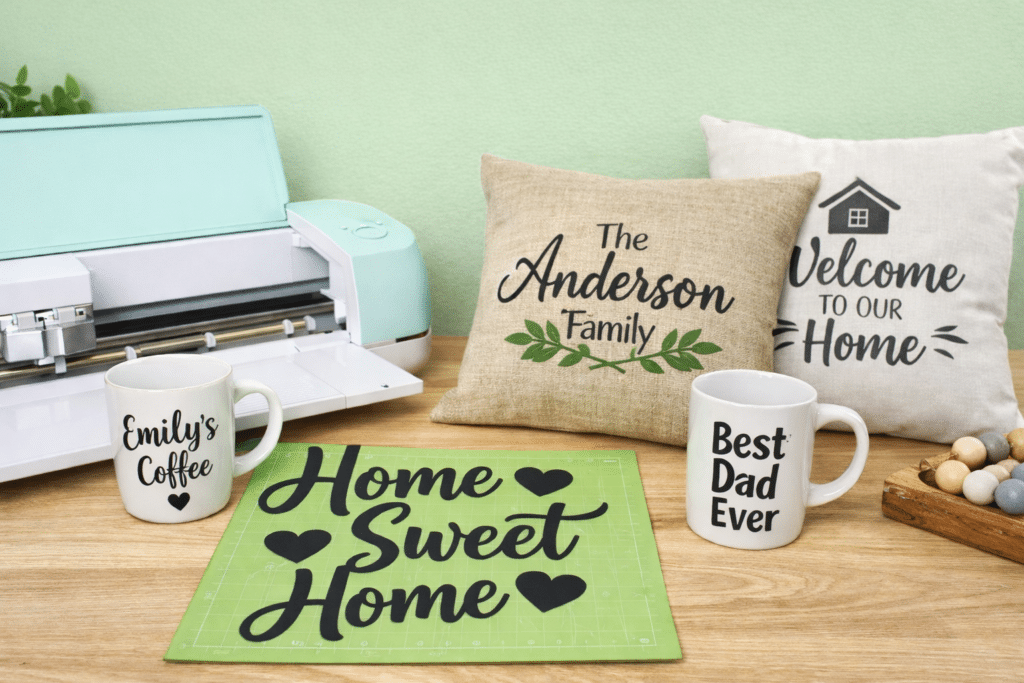
Wall Art: Create custom wall decals or framed art using vinyl or cardstock. Use inspirational quotes, family names, or geometric patterns to add personality to any room.
Custom Pillows: Cut iron-on vinyl designs from SVG files and transfer them onto pillow covers. This is a simple way to refresh your living room or bedroom with unique patterns or monograms.
Decorative Signs: Wooden signs are a popular home décor item. Use your Cricut to cut stencil designs from cardstock or vinyl, then paint over the stencil for a professional look.
Table Centerpieces: Design intricate paper or vinyl centerpieces for holidays, parties, or seasonal décor. SVG files make cutting detailed patterns fast and precise.
Holiday and Seasonal Projects : From personalized Christmas ornaments to Halloween decorations, SVG files allow you to make festive décor items that match your home’s style.
Tips for Working with Cricut and SVG Files
- Organize your SVG files: Keep your library sorted by project type or room.
- Layer management: Complex designs often have multiple layers; label each layer to avoid confusion.
- Material choice matters: The right material ensures your project is durable and visually appealing.
- Use transfer tape for vinyl: This helps move your design cleanly onto walls or other surfaces.
- Experiment with color and textures: Mix materials and finishes to create unique effects.
These small adjustments can make a big difference in the quality of your personalized home décor. Using the tips and resources from Craftpi can help you plan each detail for a more professional and polished final result.
Frequently Asked Questions
What materials can I use with Cricut for home décor?
You can use vinyl, cardstock, iron-on, fabric, wood veneer, and specialty papers, depending on your Cricut model.
Are SVG files free?
Many SVG files are free, but there are also premium designs available for purchase that provide more complex or detailed options.
Can I resize SVG files without losing quality?
Yes, SVG files are vector-based, so you can scale them to any size without compromising quality.
Do I need experience to use Cricut for home décor?
No, Cricut machines are beginner-friendly. Start with simple projects and gradually explore more complex designs.
How do I transfer vinyl designs to walls or surfaces?
Use transfer tape to carefully move your cut design from the backing sheet onto the surface. Smooth it out to prevent bubbles.
Can I make fabric home décor with SVG files?
Yes, the Cricut Maker model can cut fabric, allowing you to create custom pillows, table runners, and more.
How do I choose the right SVG file for my project?
Consider the complexity, number of layers, and the material you’ll be using. Preview in Cricut Design Space before cutting.
Can I reuse SVG designs for multiple projects?
Absolutely! Once purchased or downloaded, most SVG files can be reused as many times as you like.
What is the best way to store my Cricut creations?
Keep vinyl, cardstock, and finished projects organized in a dedicated craft space. Use folders for digital SVG files for easy access.
Where can I find inspiration for Cricut home décor projects?
Pinterest, crafting blogs, and online SVG marketplaces offer endless inspiration and project tutorials.


 No products in the cart.